Transformation
The midnight hand
A curious hand, a deadpan stare, and a gothic costume reveal.
Choose an idea, add your photo, and give your Halloween moment a little movie magic.
JPG, PNG or WebP · Up to 10 MB · Sent only when you generate.
Adds to your video direction. Example videos stay the same.
Seedance 2.5 · Audio included · See credit costs
Watch an example. Find your AI Halloween look.
Make the direction your own.
A curious hand, a deadpan stare, and a gothic costume reveal.
A doll mask shifts as you peek from behind its edge, then hide again.
A small head movement becomes a bold jack-o’-lantern makeup reveal.
Pumpkin face paint, a haunted rose doll, and a pastel Halloween clown.
Moonlit theatrical horror built around one unsettling portrait move.
A hand covers the face; a theatrical red-haired clown appears.
A striped nightmare costume steps through a misty, lantern-lit alley.
A purple-suited trickster turns a pumpkin street into a character portrait.
A hand passes the lens, revealing dark lipstick and a crimson vampire gaze.
An everyday look becomes a witch, then a skeleton suit as bats sweep through the garden.
A calm night-time selfie turns into a frantic escape from approaching zombies.
A playful inverted portrait with soft bat wings and a cheerful little smile.
A seated bat-costume portrait comes alive with a smile and a tiny wing wiggle.
A witch portrait pulls back into a broomstick flight beneath the full moon.
An AI Halloween reveal reads best when a hand, a head turn or a sleeve creates one clear transition. Pick the action you want to try in the example gallery.
Start your AI Halloween video with a clear face and even light. The selected look guides the makeup and motion; likeness can vary, so inspect the finished clip.
Use five seconds for a small AI Halloween gesture or ten for a longer reveal. Three-look sequences require ten seconds. Generated sound may vary with each run.
Choose one photo and one AI Halloween direction. Examples illustrate the idea; an exact match is not guaranteed.
An AI Halloween video turns a still portrait into a short seasonal scene with movement, makeup and atmosphere. Choose an example, add your own photo and select your settings. The AI Halloween video generator creates a new clip from that direction, rather than placing a static filter over the original. You can start with a vampire reveal, pumpkin makeup or a moonlit character entrance without filming a costume change yourself.
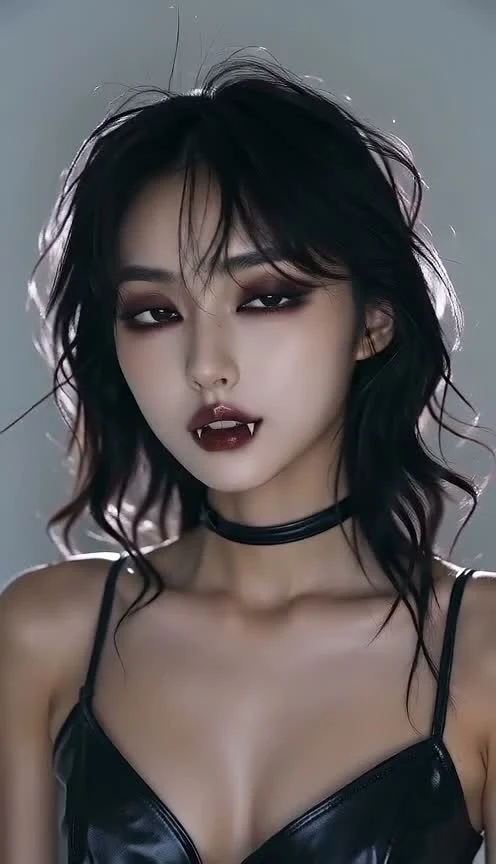
Start with The velvet vampire to follow this tutorial. Its AI Halloween effect uses a hand-over-lens transition, darker makeup and a red-eyed finish. Watch the example first, then select the same idea in the generator. Other cards offer different actions, from pumpkin face paint to a broomstick flight. Pick one clear idea for your first video so the finished reveal is easy to follow.
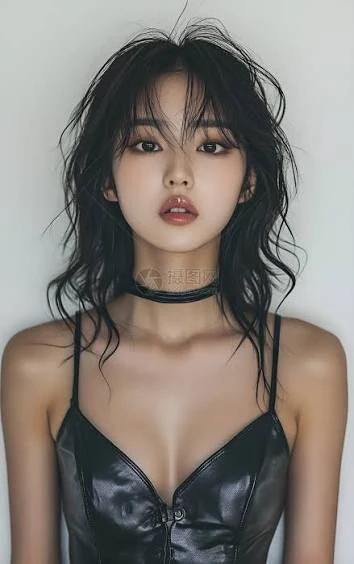
Use one face with visible eyes and even lighting, like the reference photo shown here. Keep both image dimensions at least 300 pixels and use a JPG, PNG or WebP under 10 MB. Avoid sunglasses, groups and tightly cropped heads. Your AI Halloween result uses this photo to guide identity; a clean reference helps, but exact likeness is not guaranteed. Photos are sent only when you start generation.
Choose 9:16 for a vertical AI Halloween video or 16:9 for a wider scene, then select 480p or 720p. Use five seconds for a brief gesture or ten for a longer transformation. Sign in, check the displayed credit cost and confirm photo permission before generating. Review the face, motion and audio, then download your MP4. Your AI Halloween video also appears in My creations; save a local copy within 30 days.
The same reference portrait and The velvet vampire example are used across these steps. This is an example result, not a guarantee of your output.
Makeup reveals work through a visible turning point. The velvet vampire covers the lens before the new makeup appears; pumpkin ideas use a small head movement. Choose an AI Halloween look whose gesture you like, then keep your optional personal detail short. A lipstick color or earring can personalize the direction without competing with the main action. The selected example guides the idea, but each generation can produce a different performance.
A character scene gives the outfit a setting and a small action: an entrance, a glance or a flight. For an AI Halloween clip on Reels, TikTok or Shorts, a vertical frame keeps the subject prominent. Leave room above the head for hats and below the face for captions. Watch the result at phone size before posting. Platform crops, upload limits and audio rules vary, so check the destination app.
Choose one subject, one action and one mood. A clear portrait gives the AI Halloween generator more useful detail than a distant face or a heavily filtered selfie. Match the photo to the template: adult portraits for adult characters, guardian-approved child photos for family ideas. Keep the first run simple and inspect the result before trying a new detail. Extra effects do not automatically improve likeness or continuity.
| Format | Best use |
|---|---|
| 9:16 vertical | AI Halloween stories, Reels and short-form posts where the face should fill the screen. |
| 16:9 wide | AI Halloween scenes where the setting and costume need more room around the subject. |
| 480p or 720p | Pick a smaller AI Halloween preview or a higher-resolution clip. Check the live credit cost before submitting. |
Know your photo, your video and your next step.
See formats & credit costsChoose a look, upload one reference photo, select format, resolution and duration, then generate. The AI Halloween tool creates new moving frames using the selected direction. It is not a guaranteed frame-for-frame reproduction of the example. Finished videos appear in the preview and My creations.
Use a clear single-person portrait with visible eyes, even light and room around the head. The AI Halloween generator accepts JPG, PNG and WebP files under 10 MB with at least 300 pixels on each side. Only use photos you have permission to upload.
Yes. Add one compatible detail, such as an accessory or accent color, in the optional field. Keep the selected AI Halloween action as the main idea. Family templates ignore free-text additions to keep their direction consistent and age-appropriate. An exact costume, face or movement cannot be guaranteed.
Audio generation is enabled. Your AI Halloween clip may include atmosphere, sound effects or other generated audio, but exact sounds and synchronization vary. Listen before sharing. The tool does not supply a licensed song or promise compatibility with every social platform’s music rules.
The generator shows the credit cost for your selected duration and resolution before you submit. Account credits also work with the other public tools. Check Pricing for current packs. Confirmed failed generations return their reserved credits; avoid resubmitting a task that is still being reviewed.
Your uploads and account creations are private by default. Photos and generated videos are kept for 30 days, so download anything you want to keep. Browsing AI Halloween examples does not upload your photo. Read Privacy for processing and deletion details. The tutorial and gallery examples are separate from your private results.
Some gallery clips are third-party style references from LightX. The velvet vampire tutorial uses a Zombies AI example. Your result will vary.
https://www.lightxeditor.com/ai-video-generator/ai-halloween-video/